 Droopify Team

On this page:
How to Manage Returns in Dropshipping Between Amazon → eBay
Returns and refunds may seem complicated and sometimes even frustrating, but they are an inevitable and completely normal part of the day-to-day management of a dropshipping business. Customers expect clear, fast, and above all effective solutions when items arrive damaged, differ from the images or online description, or simply do not fully meet their personal needs. It is also important to note that customers are increasingly and consciously looking for products with free returns, so they feel safe knowing they can return the product if it does not meet their expectations or satisfy them as expected.
Poor handling of these situations can easily damage your store’s reputation, generate dissatisfaction, and concretely harm your future sales. A well-managed return process does not simply solve a temporary problem; it helps build trust, strengthen the relationship with the customer, and increase the likelihood that the same customer will buy again, or at least avoid leaving negative feedback. In today’s competitive e-commerce landscape, smooth returns and refunds are just as important as the initial sale itself. When handled correctly, these processes can turn potential problems into real long-term success opportunities for your business.
What Are Returns and Refunds in Dropshipping?
Returns occur when a customer decides to send back a product after physically receiving it. The most common reasons for a return request include defective or damaged products during shipping, items that differ from the description or images shown in the listing, errors related to size or color, delivery delays, or simple change of mind by the customer, where allowed by the store’s policy. In the dropshipping model, the product is not returned to the seller—that is, you who manage the eBay store—but is sent directly back to the supplier, in this case Amazon. Thanks to using Amazon as a supplier, returns are generally free and do not directly impact our profit, making management much easier compared to other suppliers.
Refunds, on the other hand, consist of returning the money paid by the customer for the purchase. They can be full or partial and may occur either with or without a product return, depending on the seller’s policy and the specific situation. Refunds are generally issued in cases of non-delivery, damaged products, incorrect items, or following claims and payment disputes opened by the customer. In some situations, offering a partial refund while allowing the customer to keep the product can be an excellent compromise to avoid negative feedback, which would directly and negatively impact future sales.
What Is an eBay Return Policy?
An eBay return policy is the set of rules established by the seller to manage returns and refunds for items sold on the eBay platform. It clearly and transparently defines when a customer can request a return, within what time frame, who bears the shipping costs, and how the refund is issued, whether full or partial.
In dropshipping between Amazon and eBay, the return policy plays a particularly important role because the seller does not directly manage inventory or shipping. When an eBay customer requests a return, the product is generally returned according to Amazon’s return conditions, even though the seller remains solely responsible to eBay and the end customer.
The eBay return policy must therefore be carefully aligned with both eBay’s rules and Amazon’s return conditions. In the case of defective, incorrect, or damaged products, the seller is required to offer an appropriate solution, which may consist of a full refund, a partial refund, or a replacement. For low-value items, in practice, it is often preferable to issue a refund without requiring the physical return of the product, as the costs and time involved do not justify the return.
If you have not set a custom return policy, Droopify automatically manages this policy by setting free returns on all items and allowing you to customize the number of days within which a return can be requested. The return cost is set to 0, since returns on Amazon are free. For more information and to find out how you can customize your return policy, see this guide: Click here
How to Choose Between Returns and Refunds

Now that we have clarified what returns are and how they should be handled, let’s move on to understanding how to correctly choose whether to refund the customer or accept the product return. Returns can be requested directly or through a dispute. An eBay customer can request a return directly from the order summary page, or they can open a dispute, which is an official report to eBay indicating a reason such as “the package arrived damaged,” “the package I received is different from what I ordered,” or various other similar reasons.
In the case of a direct return request, if it makes sense, simply accept the return and proceed normally. In the case of a dispute, however, the seller has more options to manage the situation: it is possible to offer the buyer a return followed by a full refund, or to offer a partial or full refund without requiring the physical return of the product.
Remember that the two fundamental values you should always consider when making your decisions are:
- absolutely avoiding negative feedback
- avoiding excessive losses on the sale
Even if the situation may seem annoying or apparently unfair, sometimes it makes perfect sense to provide a partial or full refund, even breaking even or taking a slight loss on the sale, in order to avoid negative feedback and leave the customer satisfied. The absolute priority must be maintaining a solid and positive reputation on eBay and ensuring customer satisfaction. Based on the specific situation and the value of the item in question, you must therefore make the best possible choice. Obviously, if a product has a high cost, it does not make sense to fully refund the buyer without processing a return, as this would result in an excessive loss on a single transaction.
Here are some common and real examples of managing a return request:
-
Amazon account banned / suspended
-
You cannot:
- generate a return label
- recover the product
-
👉 Full or partial refund and stop (better to lose margin than risk escalation and defects)
-
-
Amazon return impossible or too expensive
-
Amazon does not accept returns for that item
-
Shipping costs higher than the product value
-
👉 Full or partial refund
-
-
Low-value product
-
Item worth €1–€20
-
If the return costs more than the product
-
👉 Full refund and the customer keeps the item
-
-
Your mistake (address, variant, color, model)
-
Seller’s fault = eBay protects the buyer
-
👉 Immediate full refund
-
-
Unsatisfied customer but working product
-
“I didn’t like it”
-
Product already opened
-
👉 Partial refund (e.g. 30–70%)
-
Often accepted without opening cases
-
✅ When to Accept the Return Instead
Only if:
- you have an active Amazon account
- you can generate a return label
- the product has medium or high value
- Amazon accepts returns for that item
📌 Quick Summary
| Situation | What to Do |
|---|---|
| Amazon account banned | ✅ Full or partial refund |
| Low-cost product | ✅ Full refund |
| Undecided customer | ✅ Partial refund |
| Your mistake | ✅ Full refund |
| High value + Amazon OK | 🔁 Accept return |
How to Accept and Manage a Return
Now that we have a clear understanding of returns and refunds, let’s go through in detail how to accept a return and the steps to follow to manage it correctly. In dropshipping, as mentioned earlier, the return never physically passes through our hands but is shipped directly to the supplier. Therefore, we must request and process the return on Amazon through the account used at the time of purchase. Once we, as eBay sellers, have received the refund from Amazon, we must then issue the refund to the eBay buyer.
How to Accept a Return on eBay:
1. Go to the eBay Seller Hub.
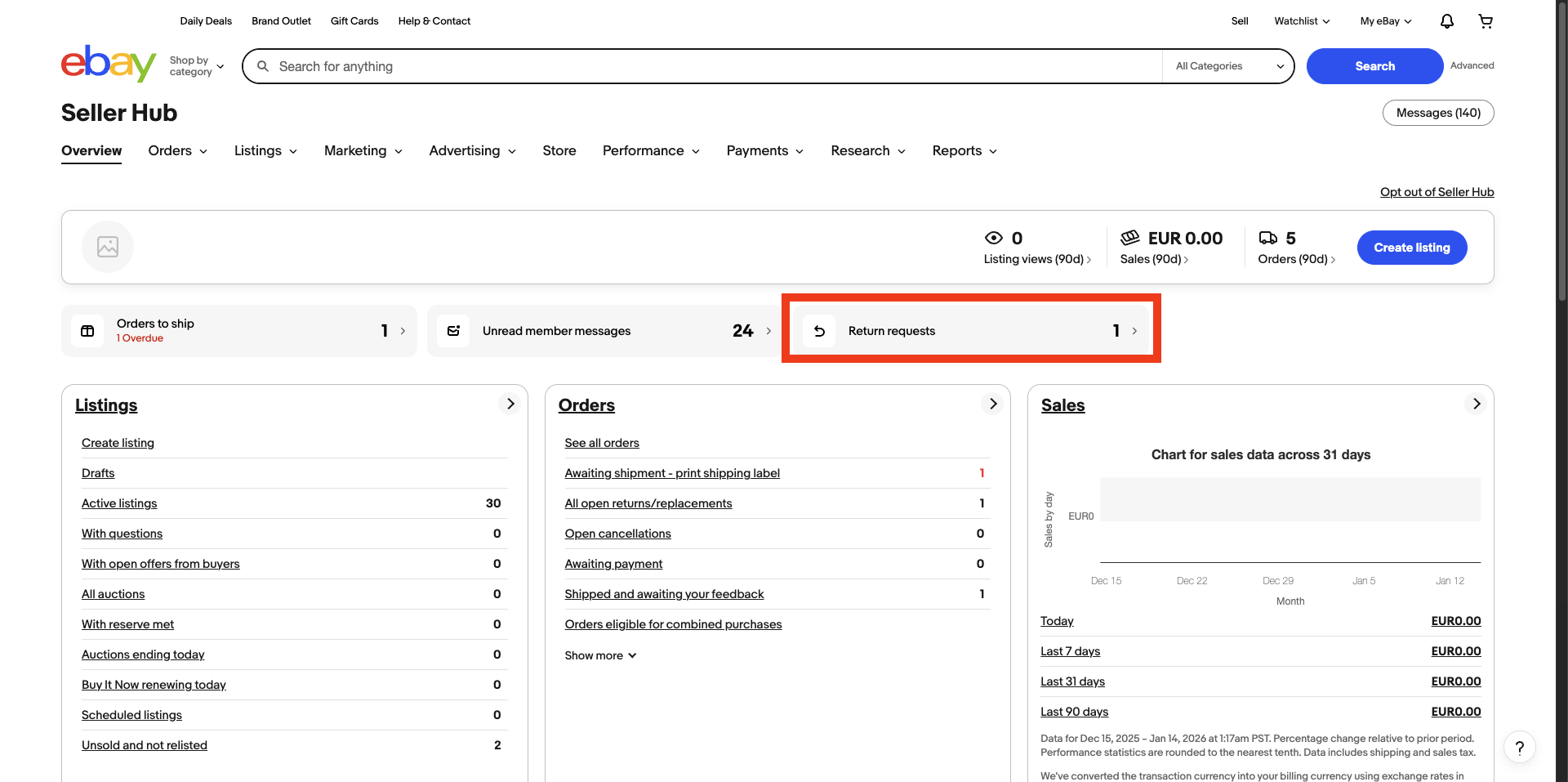
To check if we have return requests, go to the eBay Seller Hub, accessible via this link. If, as shown in the image, you see a number next to “Return requests,” it means there are returns to manage. Click on that item.
2. eBay Returns Page.
By clicking on “Return requests,” we will access this page, where all return requests requiring our attention and action are listed.
As we can see, there are several columns:
- Action: allows access to details and management of the return.
- Items: shows the image and title of the item for which the return was requested.
- Status: indicates the status of the return and the time within which we must act.
- Details: shows the return ID and the reason.
- Refund: indicative refund amount.
- Buyer: buyer’s username.
To manage the return, click on “View details” and then again on “View details.”
3. eBay Return Details and Management.
On this page, all details of the return are shown, such as the return ID, the reason, and the order ID.
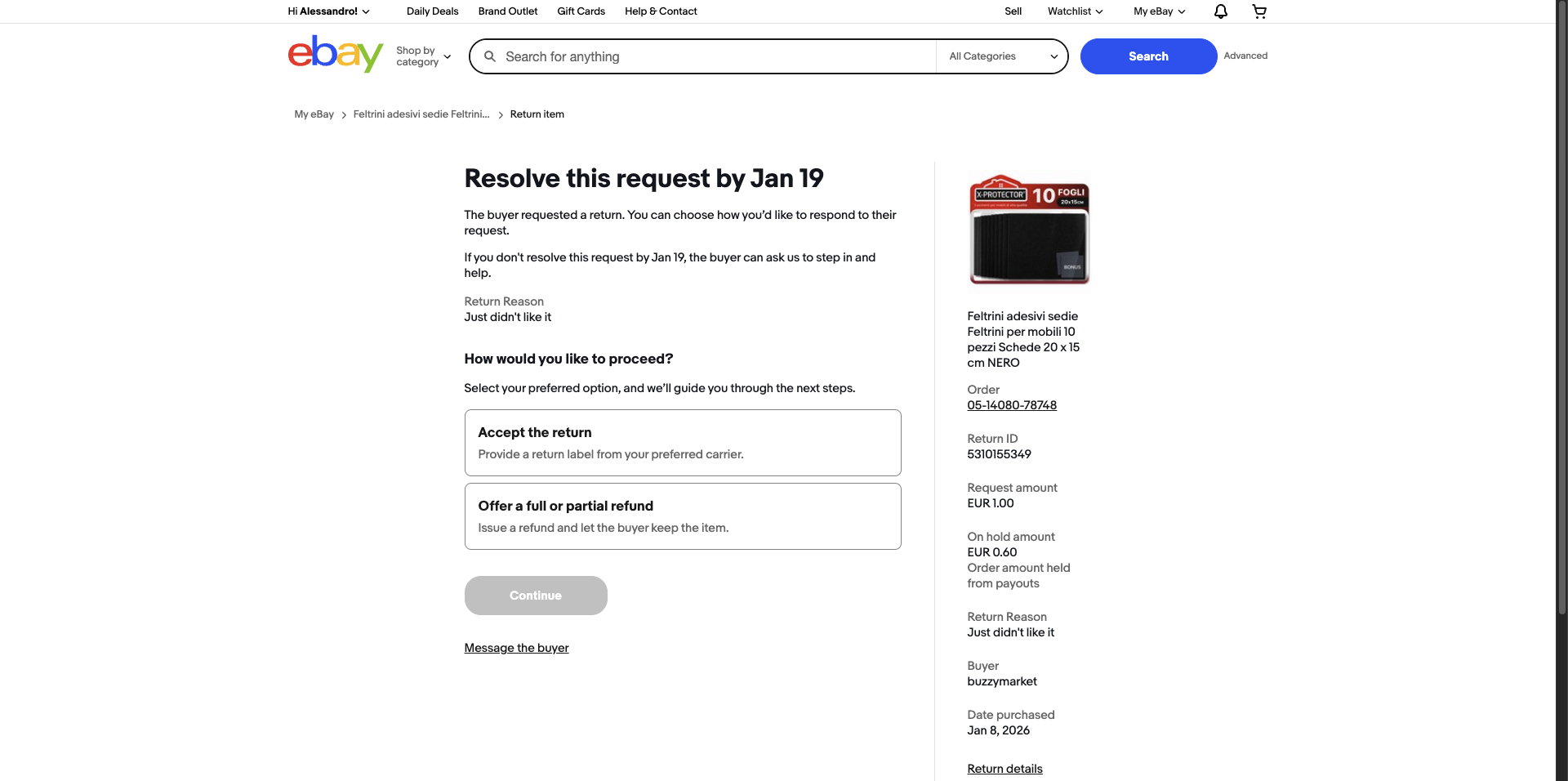
To check the order on Droopify and understand which Amazon account was used to place the purchase, we can copy the order number, for example 05-14080-78748, and verify it on the Droopify orders page.
The available actions are two:
- Accept the return
- Offer a full or partial refund
If you are continuing to read this blog, it is probably because you want to accept the return. Click on “Accept the return” and then on “Continue.”
4. Accepting the Return.
Once the return is accepted, we will arrive at this page.
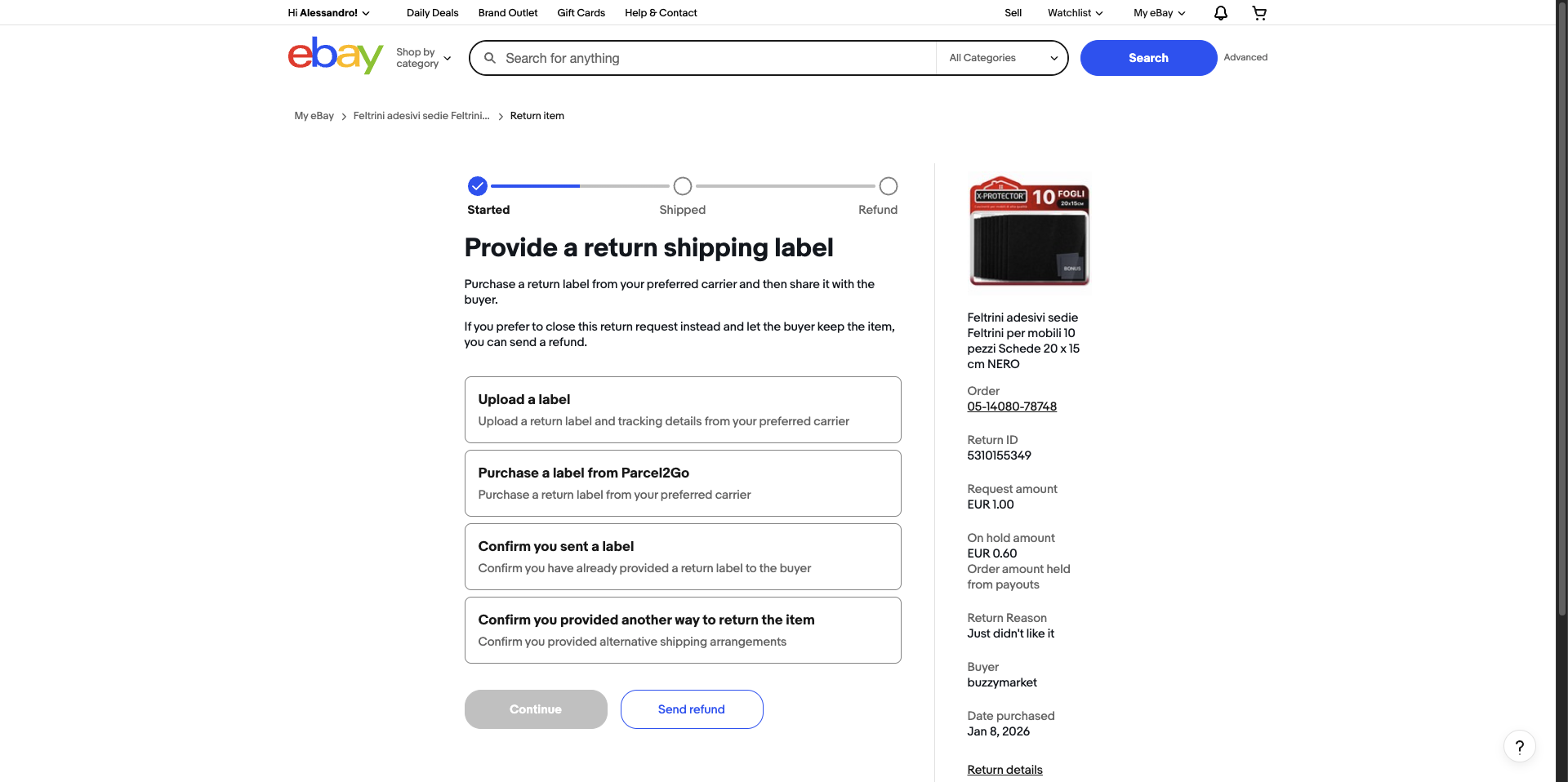
Here we can upload a shipping label or provide instructions via chat. The available options are:
- Upload a shipping label
- Buy a label: option to ignore
- Confirm you already sent a shipping label
- Confirm you provided another way to return the item
For this tutorial, select Upload a shipping label.
5. Upload the Return Label.
On this page, click on the + symbol to upload the label file or PDF instructions.
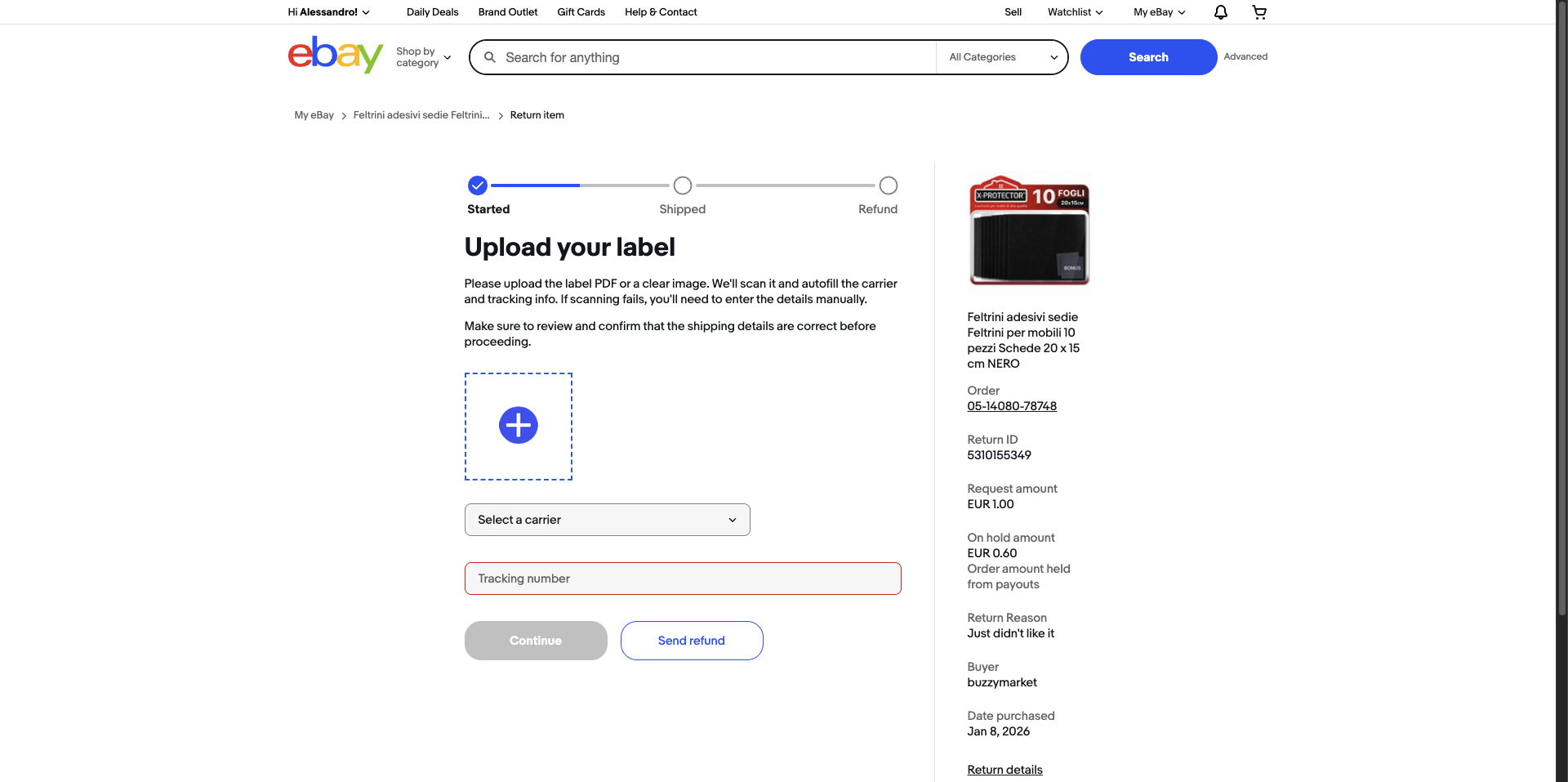
Select the carrier, even randomly if you do not know it, and enter the tracking code. If you do not have a code, you can enter NA.
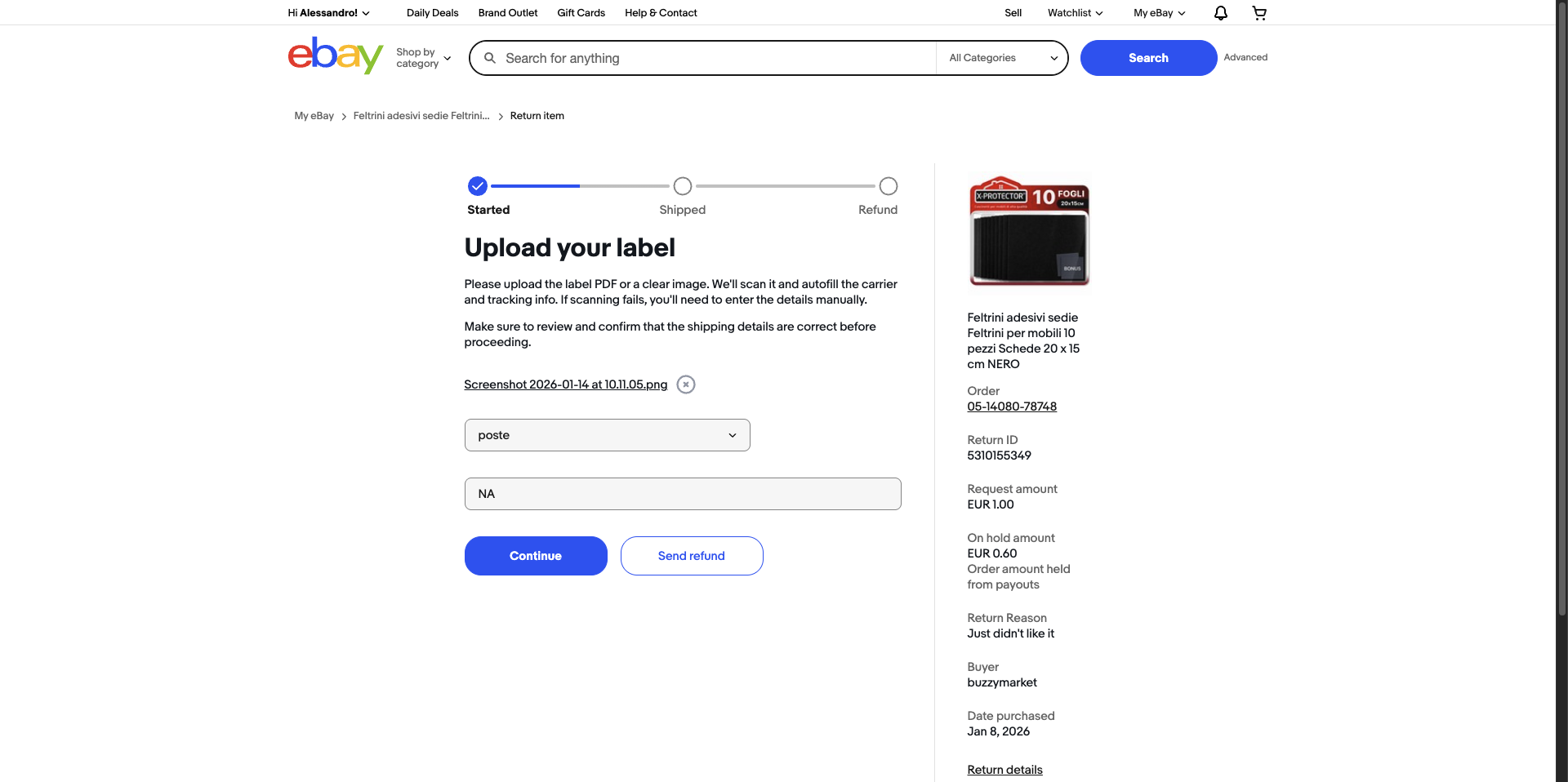
Click continue and the process is complete. Now all that remains is to wait for the buyer to return the product to Amazon, receive the refund, and then refund the eBay buyer.
How to Obtain a Return Label
When we accept a return, the first fundamental step is to understand which Amazon account was used to purchase the product. If you manage many Amazon accounts and do not remember which one you used, you can find the account email address directly in the Droopify order panel.
1. Find the Order in the Amazon Account Purchase History.
Log in to Amazon with the correct account, go to the order history, and search for the order for which we need to process the return.
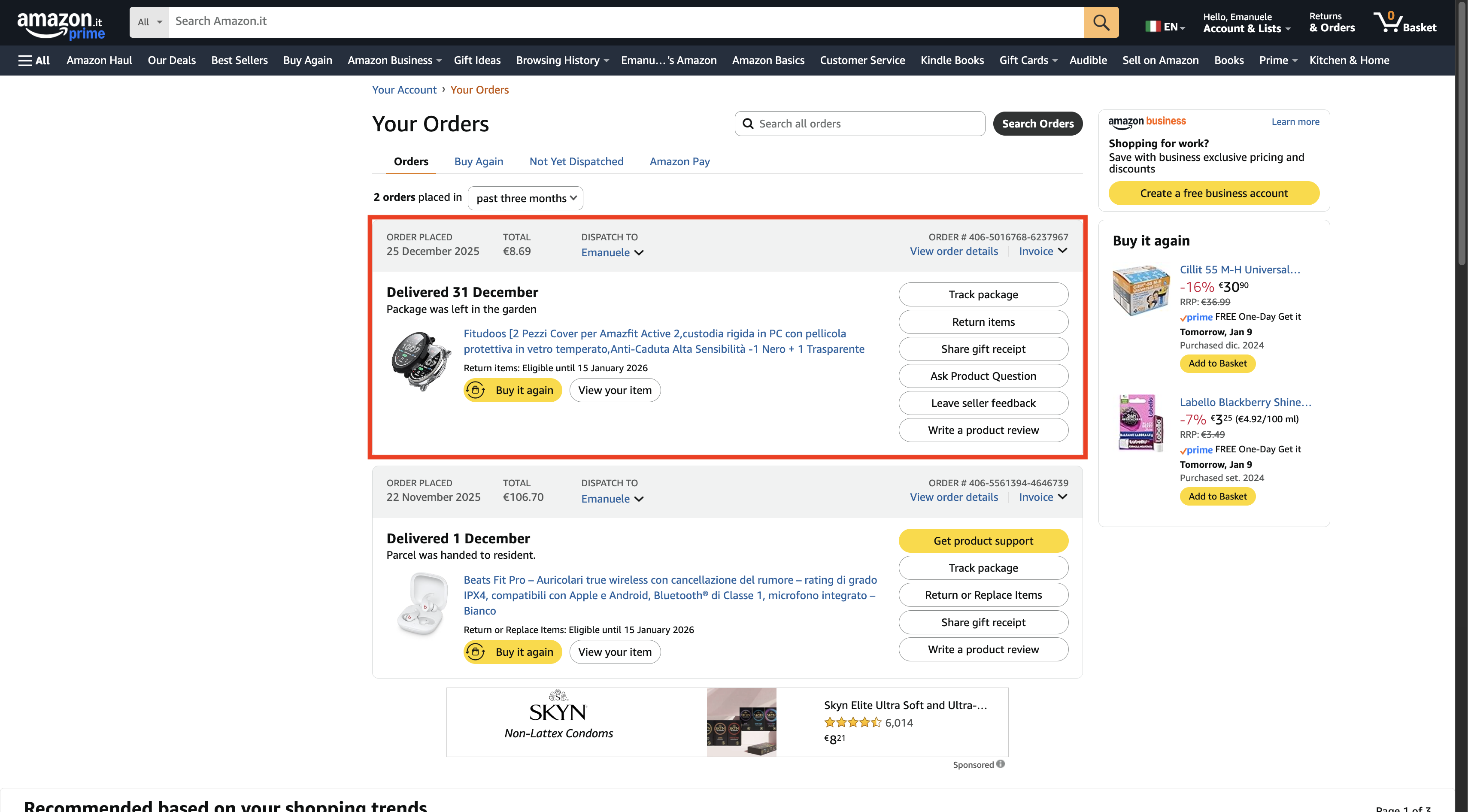
2. Start the Return Procedure.
Click on “Return or replace items” and proceed.
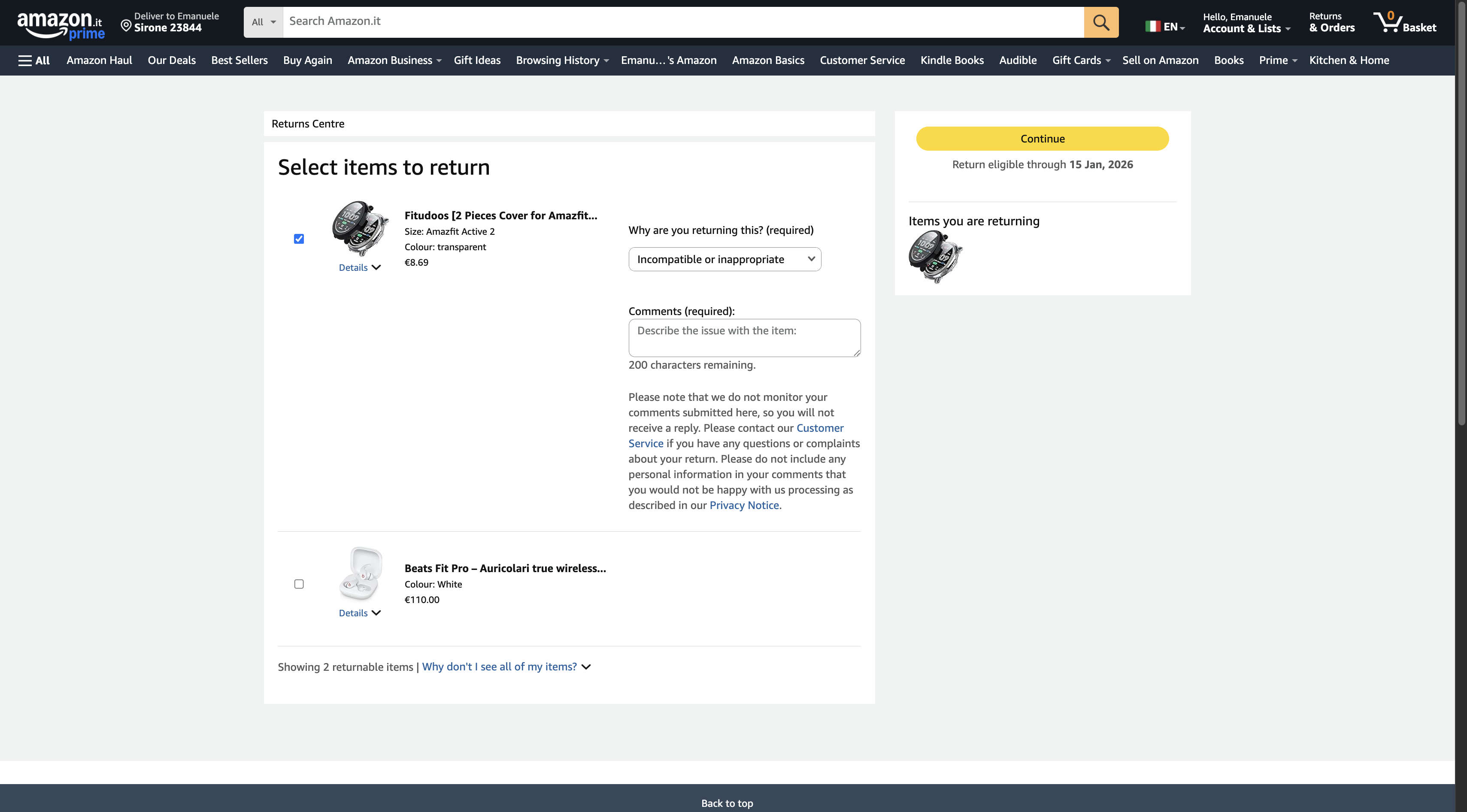
3. Complete the Return Details.
Select the reason for the return and enter a mandatory comment. You can use the same reason indicated by the buyer.
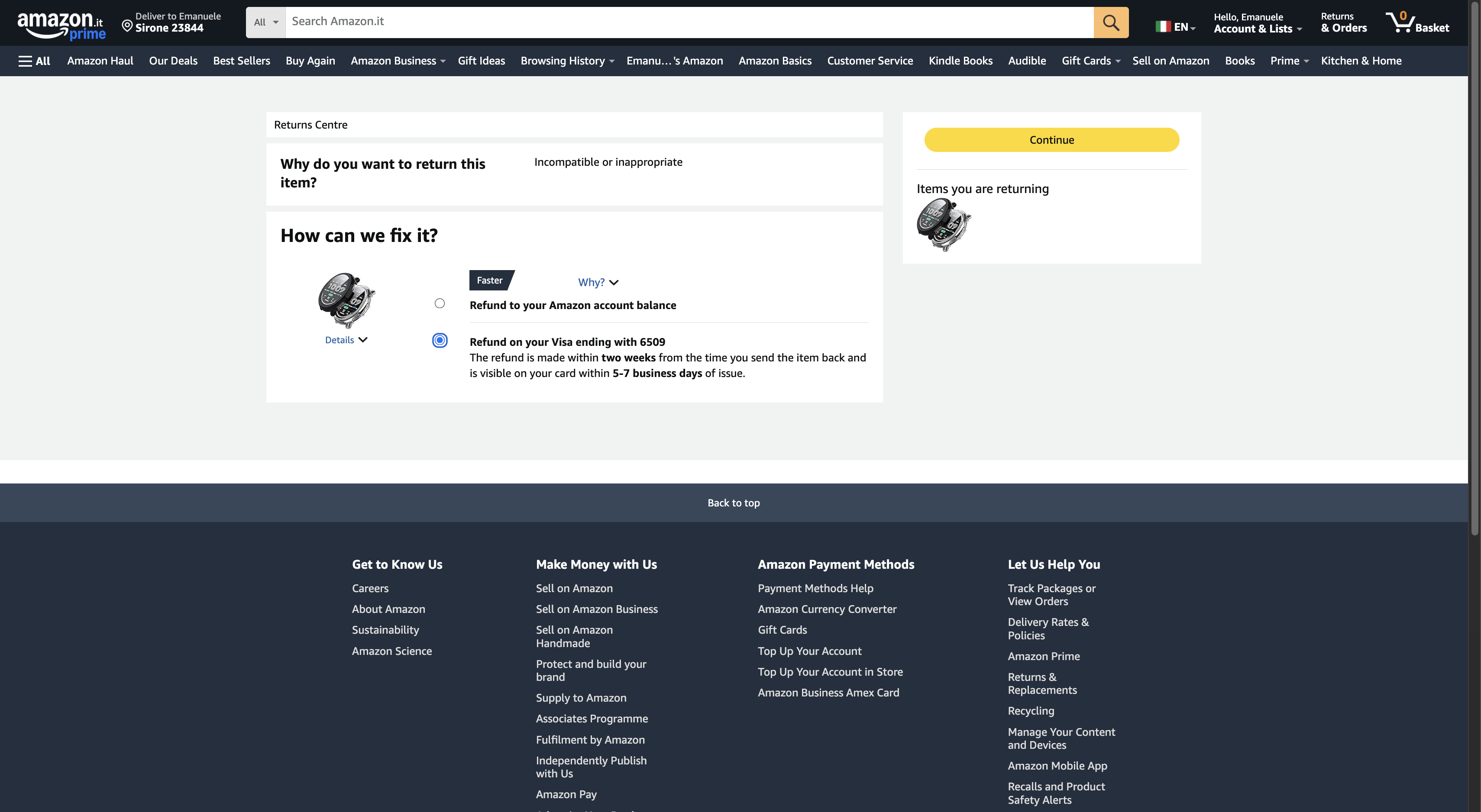
4. Complete the Refund Details.
Select the refund method, always recommending the original payment method instead of Amazon credit.
4. Select the Shipping Method.
Here we are at the final step to confirm the return. In this step, we are asked how we prefer to return the item. Usually, there are multiple options for returning the item, some free and others not. Obviously, the most convenient option is to use one of the free methods. You can either agree with the customer and request a home pickup at the buyer’s address, or select a drop-off point where you simply bring the item without even packing it. Select the option that best suits your case and proceed.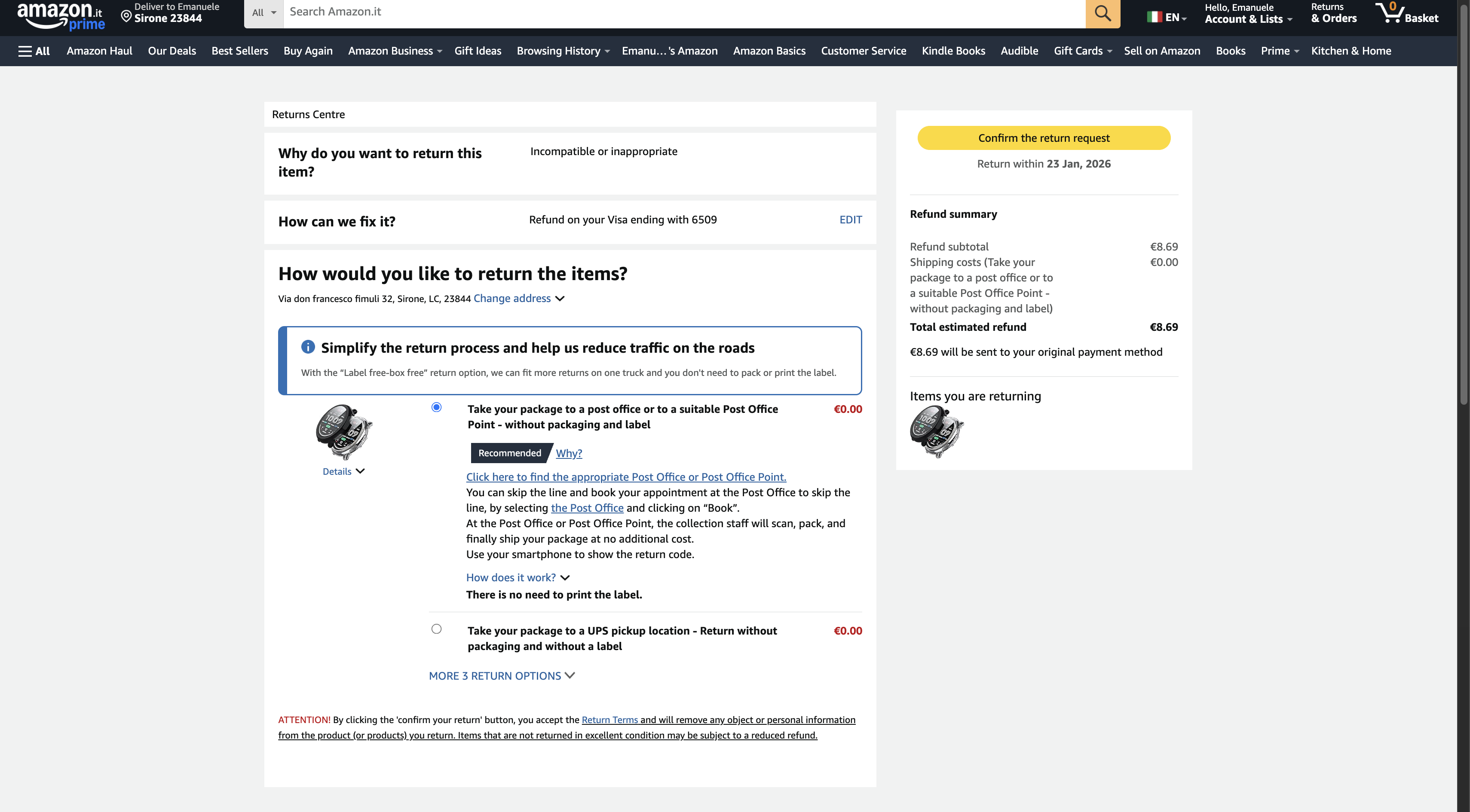
5. Receive the Return Label.
On this page, you will find the instructions and the label or QR code to forward to the buyer. In the case of home pickup, you need to agree on the address with the customer. In the case of pickup at the buyer’s address, you will also be asked at which address the pickup should take place. To enter this, you need to coordinate with your customer. What you will need to do is provide the buyer with the necessary instructions to complete the return and upload the return label in the appropriate section on eBay. If you wish, you can also prepare a custom PDF like the one shown in the image, to be used for every return, modifying each time the return label and, if necessary, the instructions.
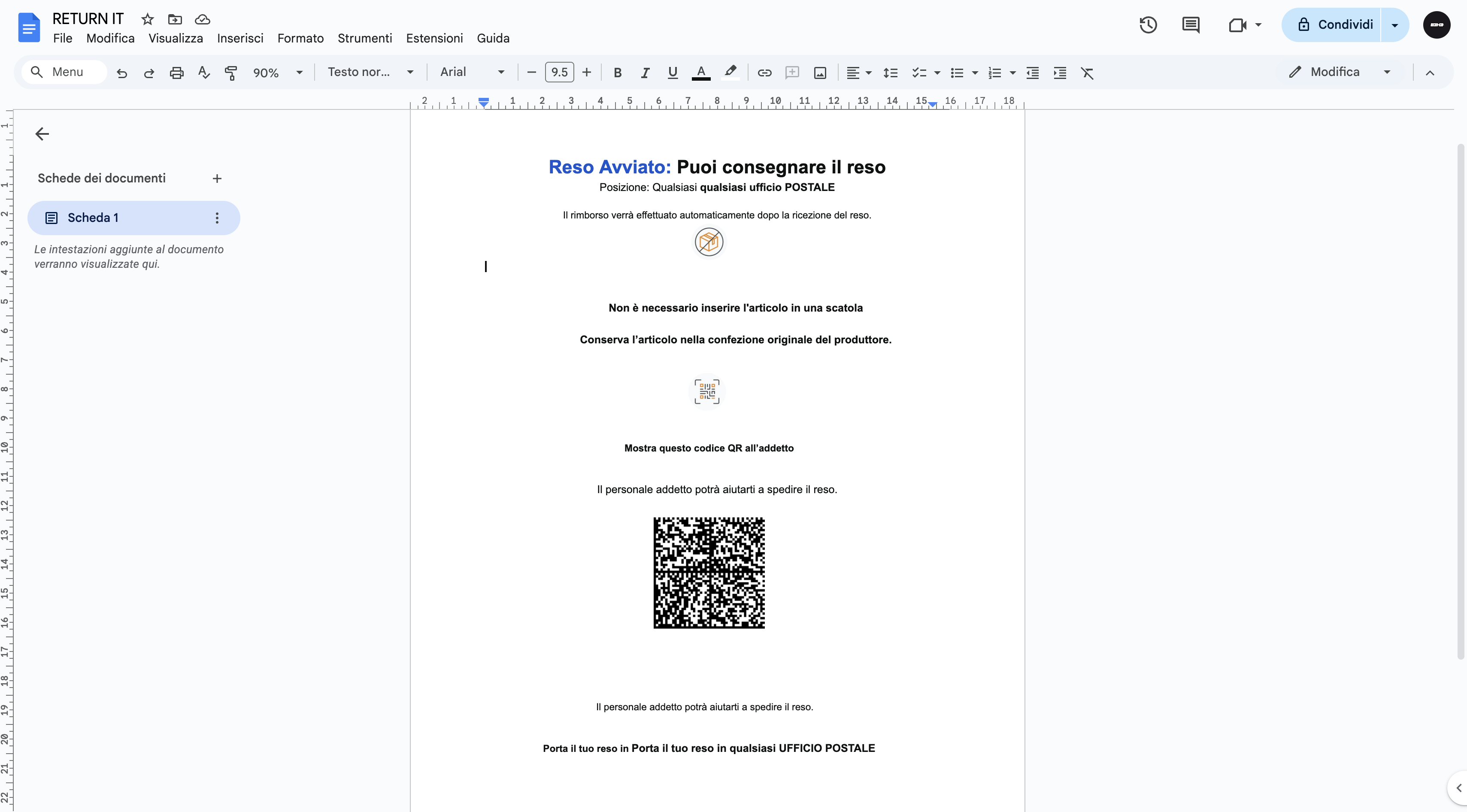
Alternatively, you can directly provide the return label without any problem; just remember to write a message to your buyer with any necessary instructions for the return. Save the file with the instructions or the label and use it to send it to the buyer.
Conclusion
In conclusion, correct, conscious, and strategic management of returns and refunds in dropshipping between Amazon and eBay is not just an operational necessity, but one of the key elements for building a solid, sustainable, and long-lasting business. Understanding when it makes sense to accept a return, when it is more appropriate to offer a full or partial refund, and how to act in different real-world scenarios allows you to minimize financial losses, protect your account, and above all maintain high customer satisfaction.
Remember that in the long run, a positive reputation on eBay is worth much more than the margin on a single sale: satisfied customers mean fewer disputes, fewer negative feedbacks, and greater opportunities for growth.
By applying the procedures described in this guide and leveraging tools like Droopify to automate and simplify return management, you will be able to handle even the most complex situations with greater peace of mind, turning every potential problem into an opportunity to demonstrate professionalism and reliability.