eBay Dropshipping Returns: How to Handle Every Case

Managing eBay dropshipping returns the wrong way costs you more than the refund itself. A single case handled poorly can trigger defects, negative feedback, and account restrictions. Here is how to handle every situation correctly, from the first return request to the final refund.
What Are Returns and Refunds in eBay Dropshipping
In the Amazon-to-eBay dropshipping model, when a customer requests a return, the product goes back to Amazon, not to you. You are the seller of record on eBay, so the responsibility for resolution always sits with you, regardless of what the supplier accepts or does not accept.
Returns happen when a buyer physically sends the product back. Refunds are the monetary reimbursement, which can happen with or without a return. In practice, the two are handled differently depending on the situation, the item value, and the state of your Amazon account.
Common return reasons:
- Defective or damaged product on arrival
- Item differs from the listing description or images
- Wrong variant delivered (size, color, model)
- Buyer changed their mind (if your policy allows it)
- Significant delivery delay
Your eBay Return Policy: What to Set
Your eBay return policy defines when buyers can return items, within what timeframe, who covers shipping costs, and how the refund is issued. In Amazon-to-eBay dropshipping, this policy must match what Amazon actually offers so you are not promising something you cannot deliver.
The standard setup for Amazon sourcing:
- Returns accepted: yes, free of charge
- Return window: 30 days (aligned with Amazon's default policy)
- Refund method: original payment method
A longer return window improves your eBay search ranking. Listings with 30-day or 60-day windows get a slight boost from eBay's algorithm.
If you have not set up a custom policy yet, Droopify automatically applies free returns to all your listings and lets you configure the return window. The return cost stays at zero since Amazon returns are free.
Don't miss our guides
Return or Refund: How to Decide
Not every return request should be handled the same way. The two values to protect are your eBay reputation (no defects, no negative feedback) and your margin (no unnecessary losses). The right call depends on the specific situation.
When to Refund Directly (No Return Required)
1. Your Amazon account is suspended or banned
You cannot generate a return label or retrieve the item. Issue a full or partial refund and close the case. Taking a margin hit is always better than letting the case escalate into a defect on your account.
2. Return is not possible or too costly on Amazon
Amazon does not accept returns for all product categories. If the return shipping cost exceeds the product value, refund directly and move on.
3. Low-value item (roughly under 20 EUR)
Processing a return for a low-value item costs more in time and effort than it saves. Issue a full refund and let the buyer keep the item.
4. Seller error (wrong address, wrong variant, wrong model)
When the mistake is yours, eBay sides with the buyer. Issue a full refund immediately to prevent escalation.
5. Buyer is unhappy but the product works fine
A partial refund of 30 to 70 percent of the purchase price often resolves the dispute without a formal return or negative feedback. Most buyers accept a partial refund over the hassle of returning an item.
When to Accept a Physical Return
Only accept a physical return when all of these conditions are true:
- You have an active Amazon account with purchase history for this order
- You can generate a valid return label from Amazon
- The product has medium or high value
- Amazon accepts returns for that product category
Decision Summary
| Situation | Recommended Action |
|---|---|
| Amazon account suspended | Full or partial refund |
| Low-value product | Full refund, buyer keeps the item |
| Buyer unhappy, product works | Partial refund (30-70%) |
| Seller error | Full refund immediately |
| High-value item, Amazon return available | Accept the physical return |
How to Accept and Process a Return on eBay
When a buyer opens a return request, eBay gives you a limited window to act before it steps in automatically. Here is the full step-by-step process.
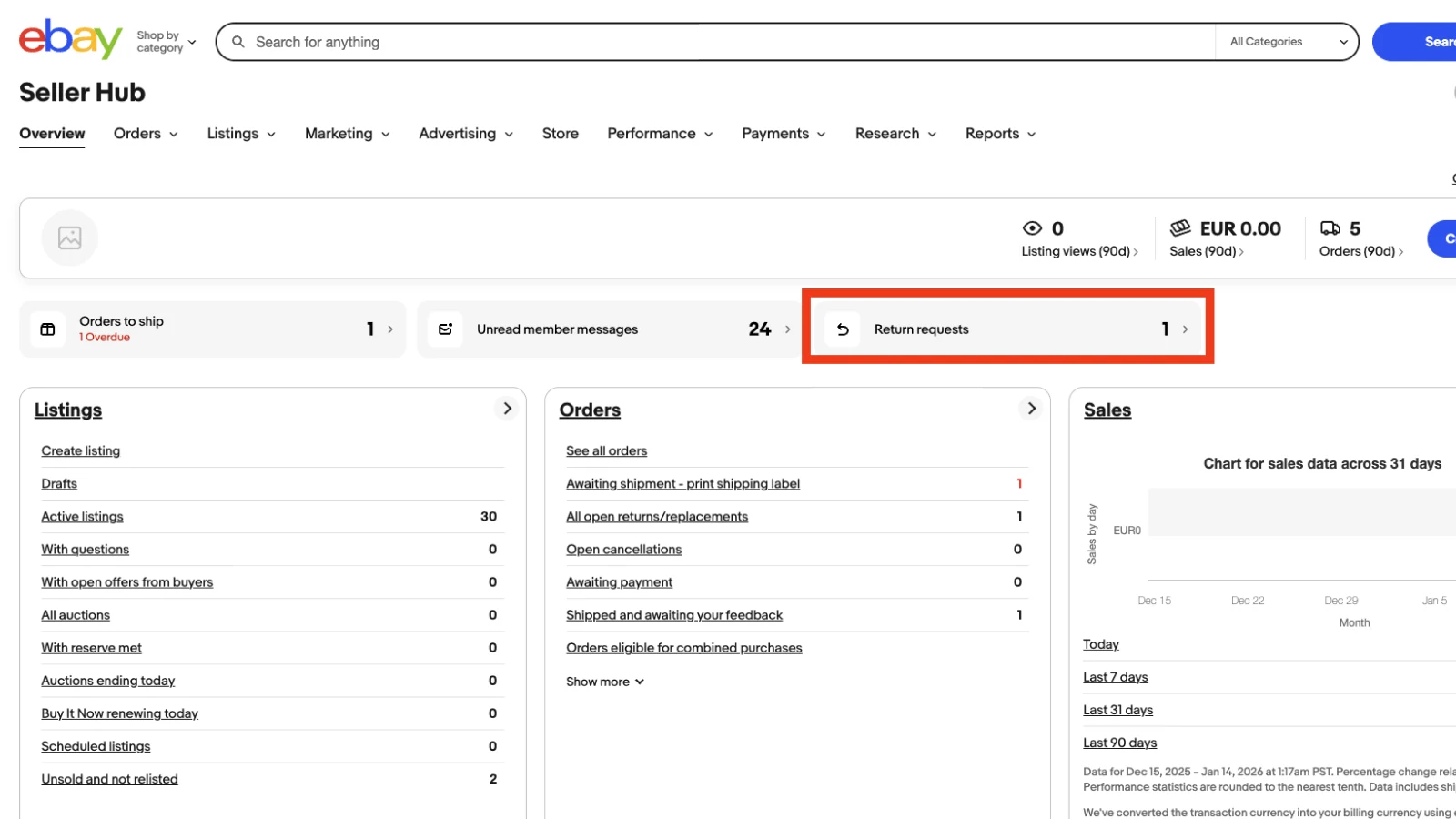
Step 1: Open the eBay Seller Hub
Go to your eBay Seller Hub. If you see a number next to "Return requests," you have pending cases that need attention.
Step 2: Go to the Returns Page
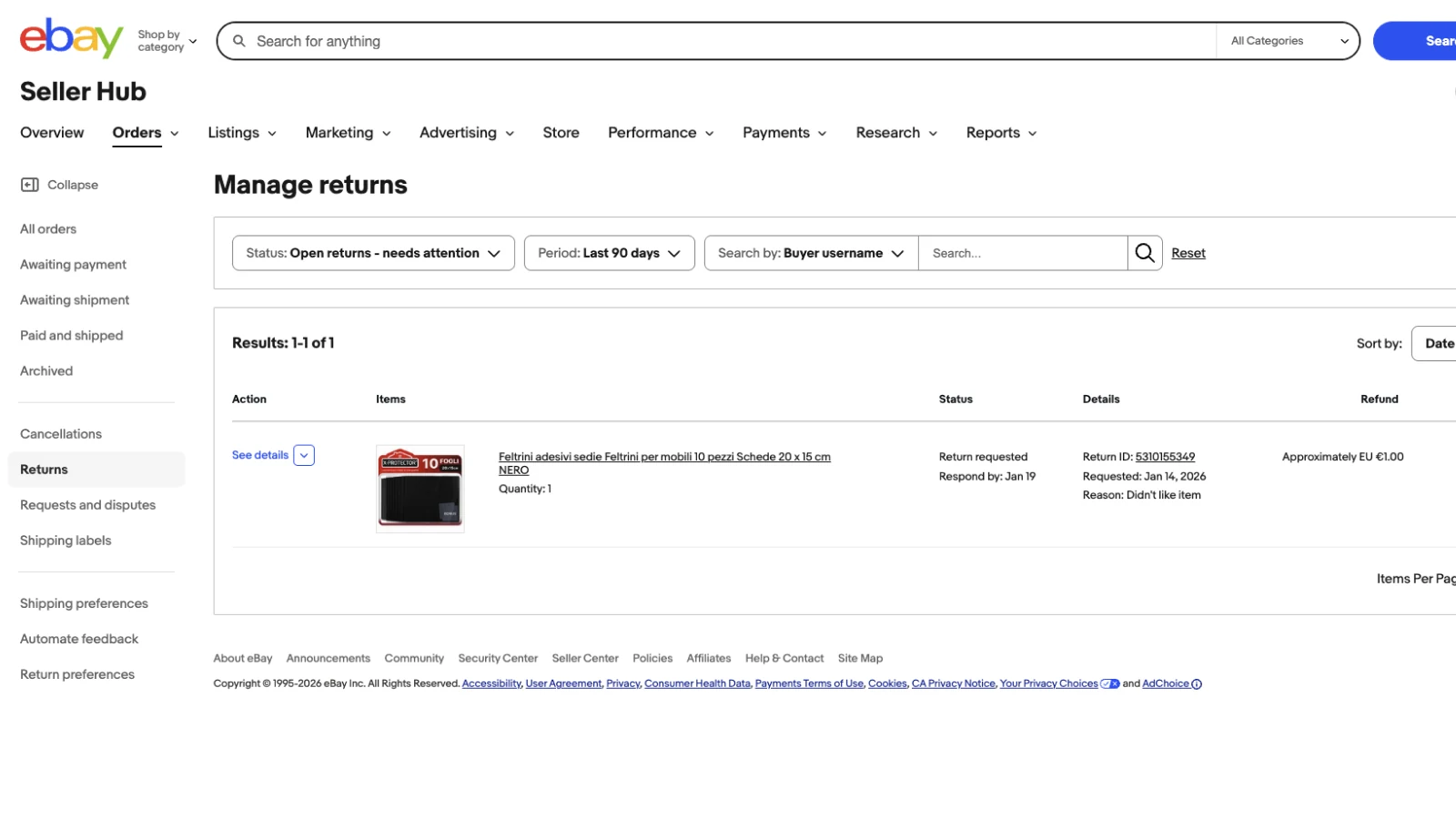
Click "Return requests" to access the active returns list. Each row shows:
- Action: link to details and management options
- Items: listing image and title
- Status: current state and deadline to act
- Details: return ID and return reason
- Refund: estimated refund amount
- Buyer: the buyer's username
Step 3: Review the Return Details
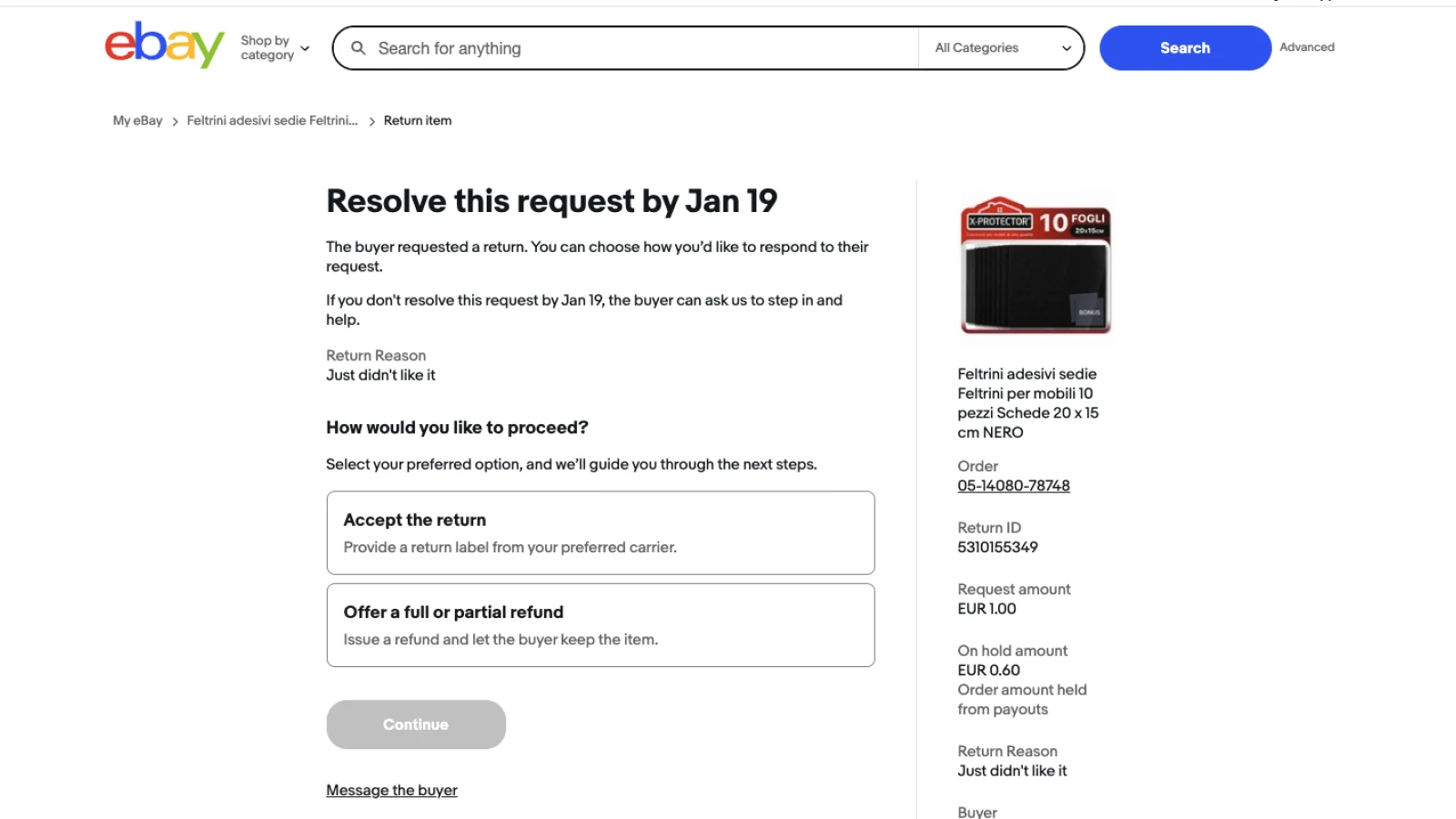
Click "View details" to see the return ID, reason, and original order number. Copy that order number and search it in Droopify to confirm which Amazon account placed the original order. This is especially useful if you manage multiple accounts via Multi-Account Management.
Step 4: Accept the Return
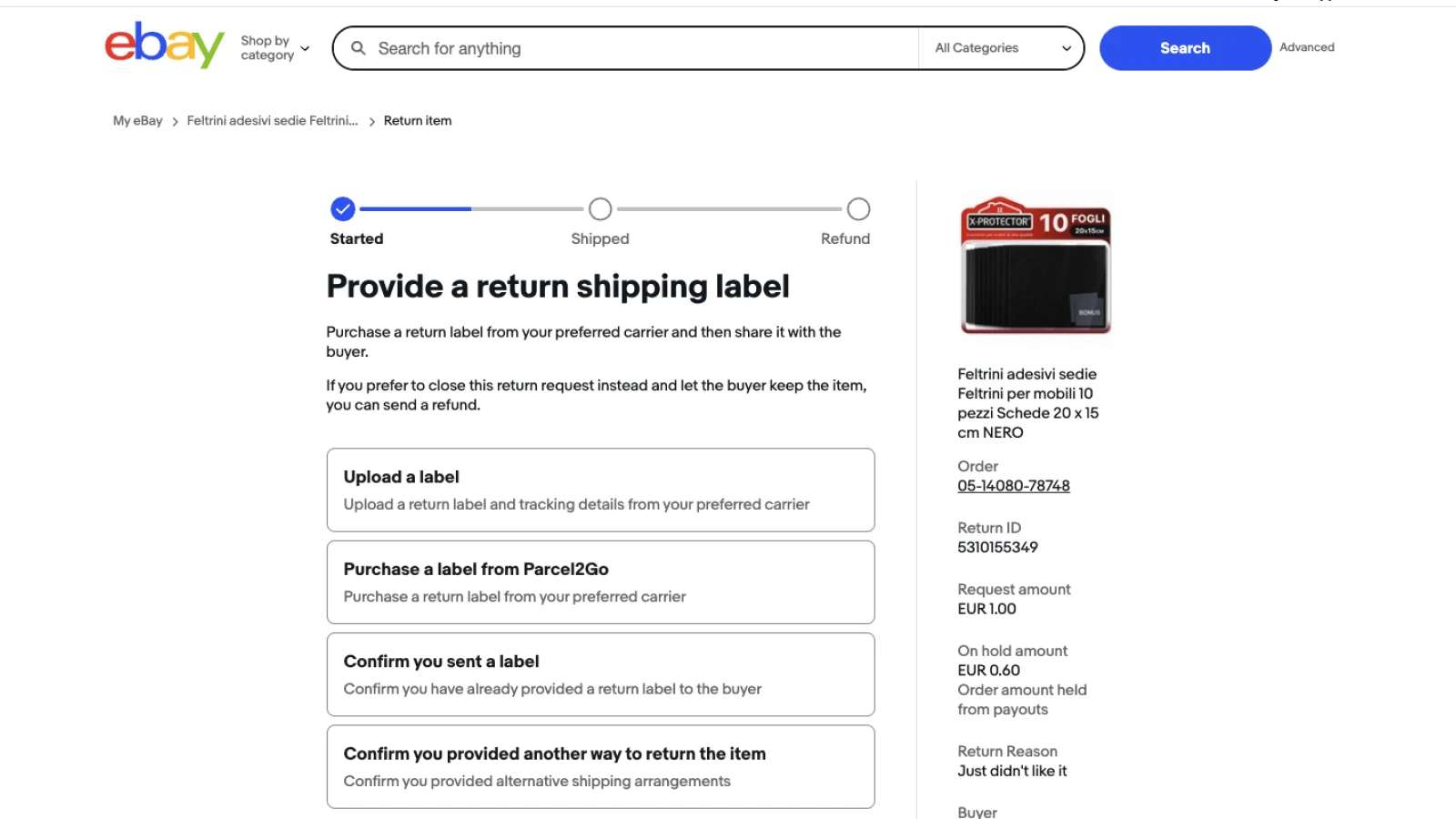
Click "Accept the return" and then "Continue." On the next screen you have four options:
- Upload a shipping label (use this one)
- Buy a label through eBay (ignore)
- Confirm you already sent a label
- Confirm you arranged another return method
Step 5: Upload the Return Label
Click the + icon to upload the label file or a PDF with return instructions. Select a carrier (you can pick any if you are not sure yet) and enter the tracking code. If you do not have a tracking code, type "NA."
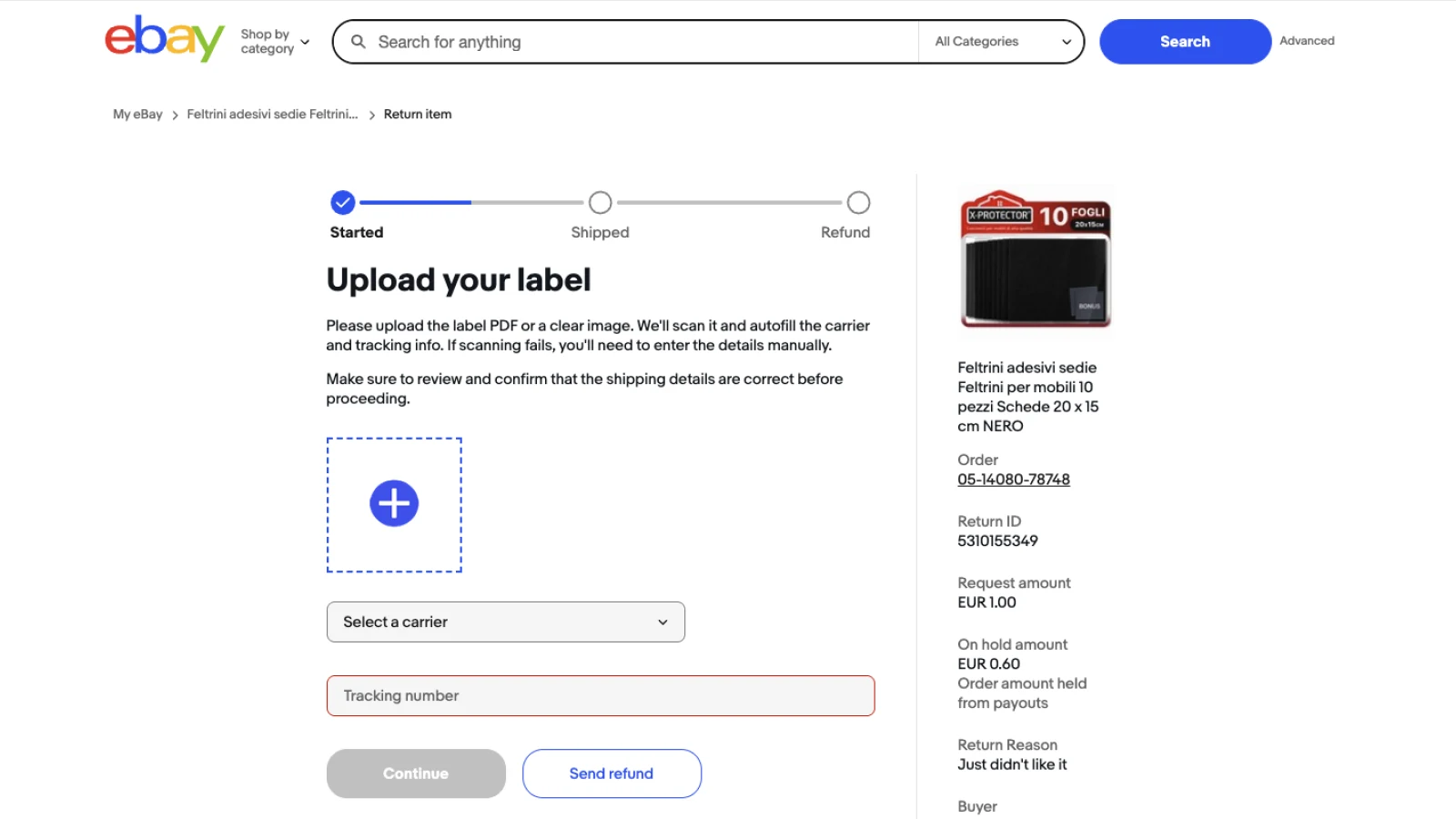
Once submitted, wait for the buyer to ship the product back to Amazon. When Amazon confirms receipt and credits your account, issue the refund to the eBay buyer.
How to Get a Return Label from Amazon
Once the return is accepted on eBay, log into the Amazon account that processed the original order and start the return flow there.
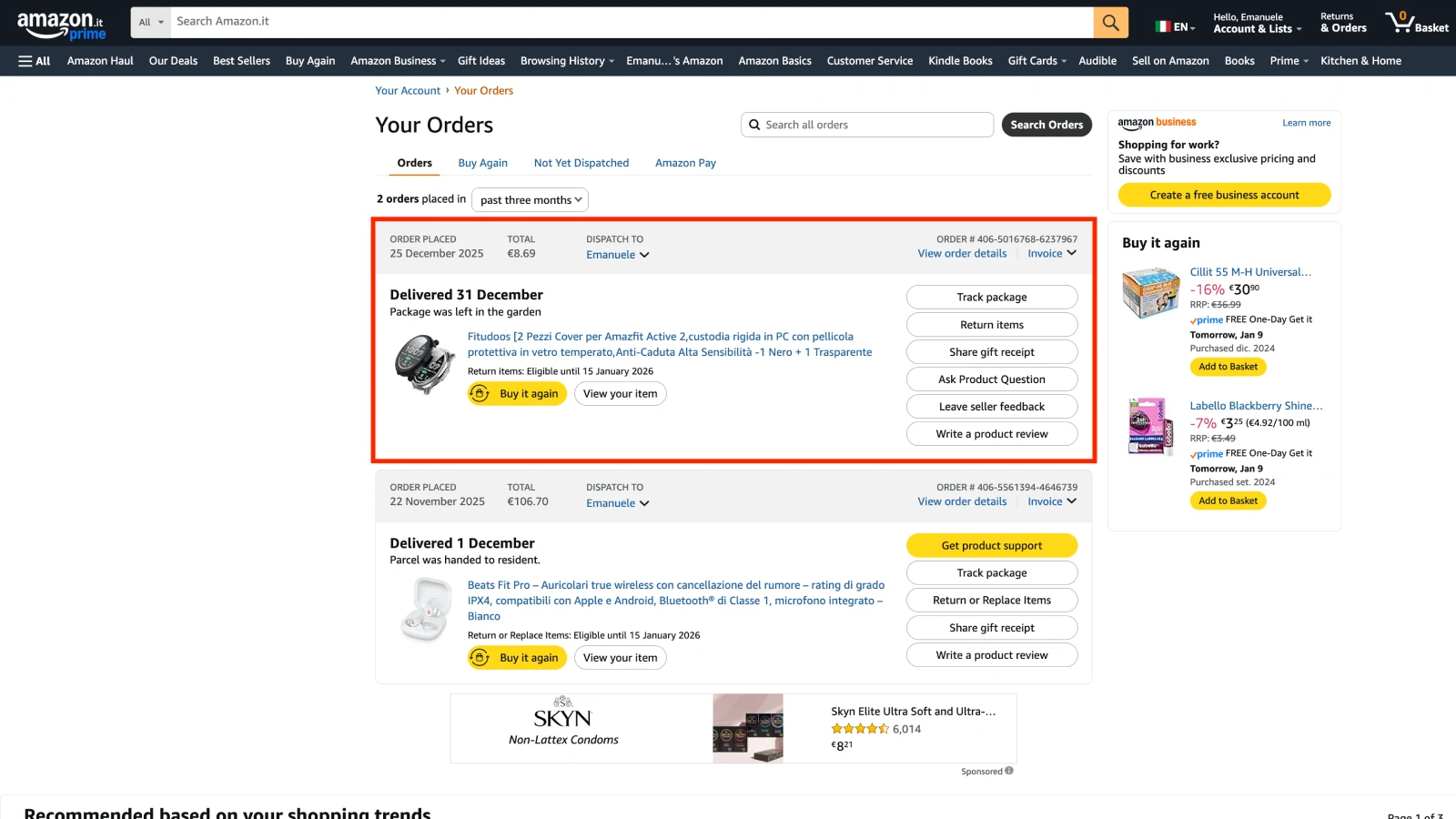
Step 1: Find the Order in Your Amazon Purchase History
Log into the correct Amazon account. Use the order number from the Droopify orders panel to locate it in the purchase history.
Step 2: Start the Return
Click "Return or replace items" and follow the on-screen steps.
Step 3: Select Return Reason and Refund Method
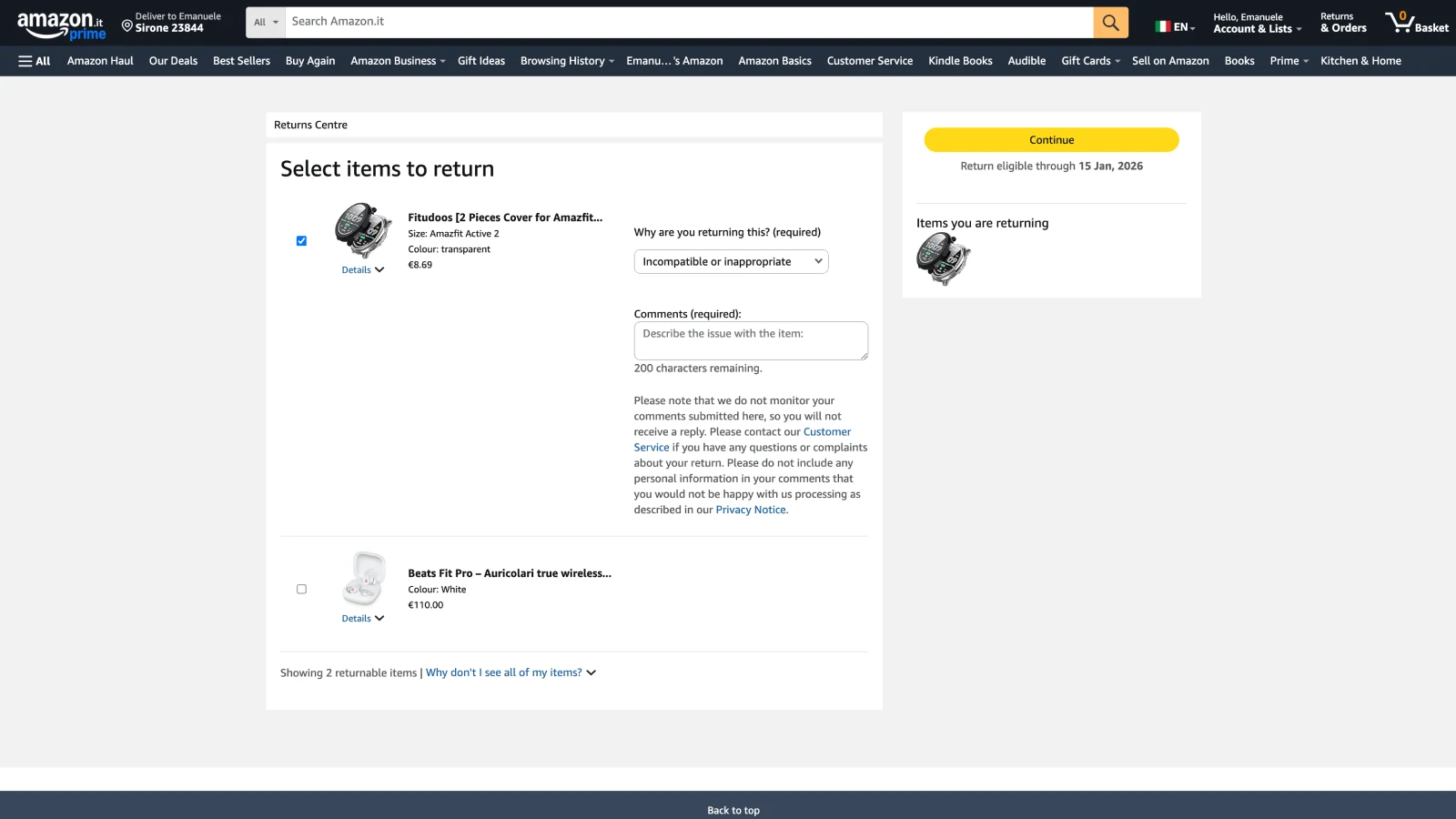
Choose the return reason. You can use the same reason the buyer stated. For the refund method, always select the original payment method, not Amazon store credit.
Step 4: Choose a Shipping Method
Amazon usually offers multiple return options. Always pick a free method: a drop-off point (no packaging needed) or home pickup at the buyer's address. For home pickup, coordinate the address with your eBay buyer before confirming.
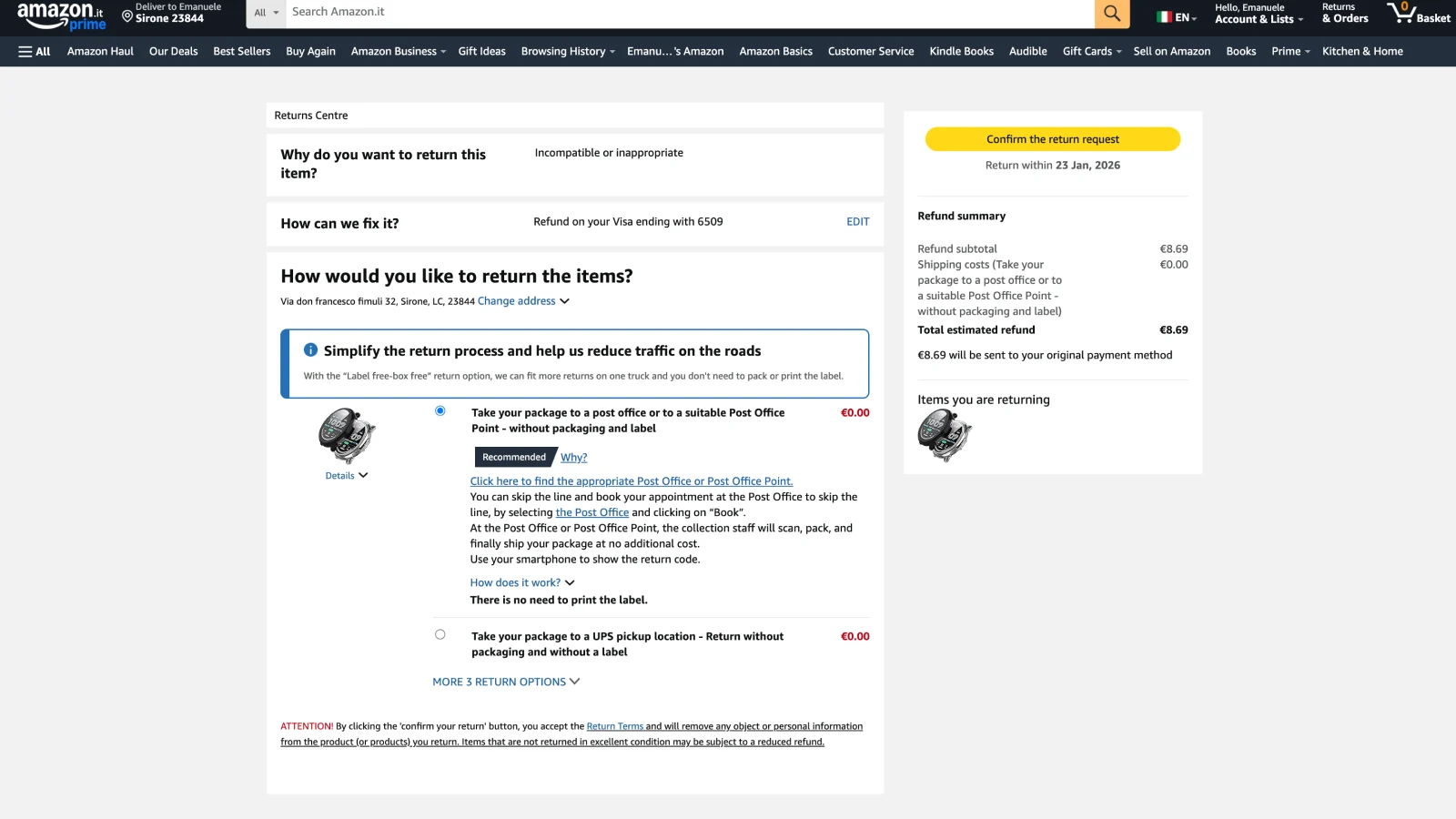
Step 5: Forward the Label to the Buyer
Amazon provides a printable label or QR code. Send it to your eBay buyer with clear instructions on how to complete the return. A reusable PDF template with step-by-step instructions saves you time every time a return comes in.
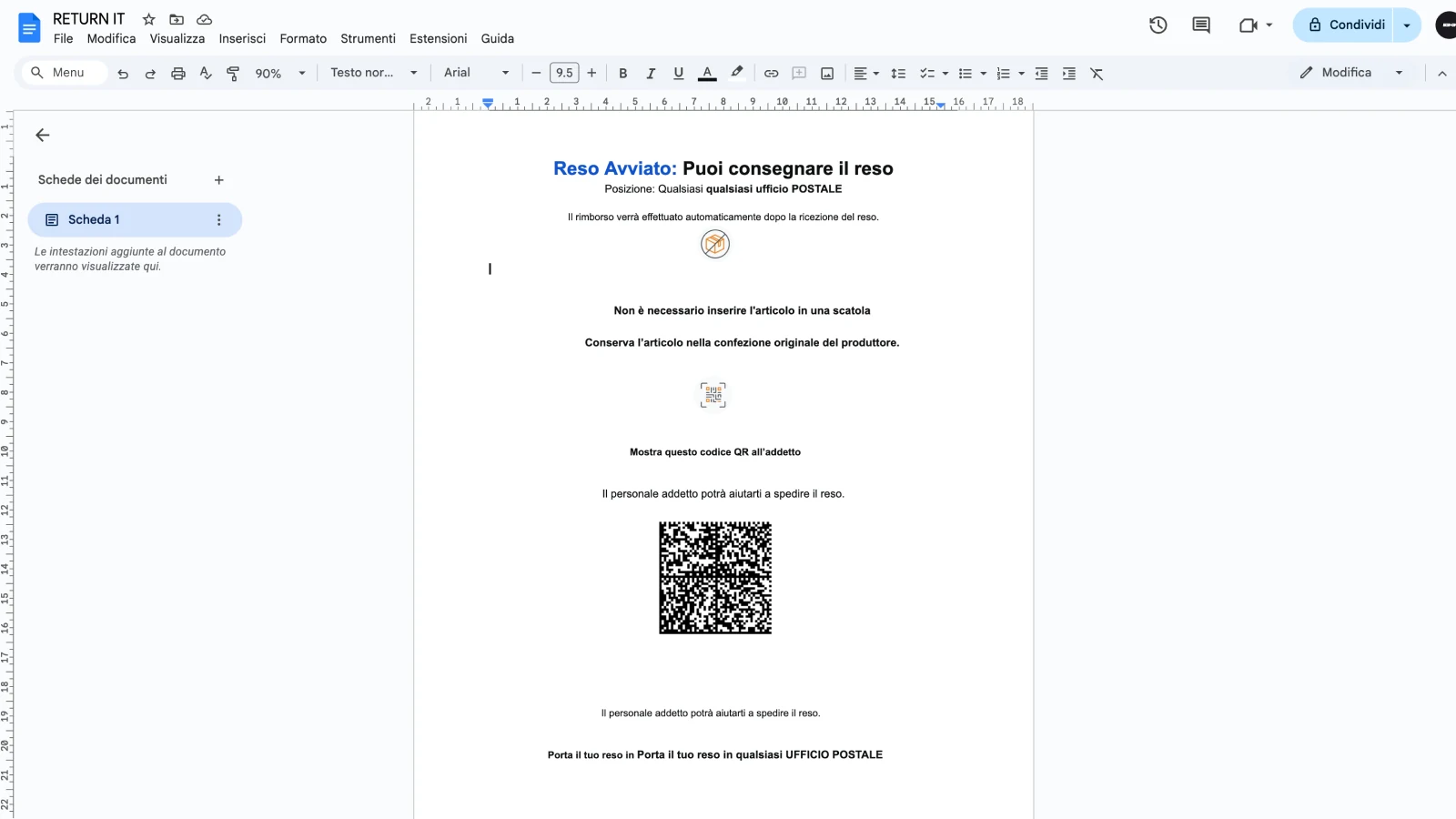
Once Amazon processes the return and credits your account, issue the refund to the eBay buyer to close the case.
Conclusion
Handled correctly, eBay dropshipping returns protect your seller account far more than they cost you. The key is making a fast decision (direct refund or physical return), acting before eBay's deadline, and keeping communication with the buyer clear throughout.
For low-value items or situations with a suspended Amazon account, a direct refund is almost always the right move. Reserve physical returns for high-value items where the math justifies the extra steps.
Droopify's Automatic Order Fulfillment keeps your order history organized so you can always trace which Amazon account fulfilled each order, saving you time the moment a return request lands. Try Droopify free for 14 days.