Done For You eBay Dropshipping: Manage Your Clients with Droopify


Managing 10 client eBay stores from separate browser profiles, juggling 10 different passwords, and waiting for OTPs every time you switch accounts: that's the daily reality of most done for you eBay dropshipping operators. Droopify's Delegated Access was built to fix exactly this.
What Is Done For You eBay Dropshipping?
Done for you (DFY) eBay dropshipping is a service where you, as a professional, manage an eBay dropshipping store on behalf of a client. The client owns the account and provides the capital; you bring the expertise, the workflow, and the daily execution.
As a DFY provider, you typically handle:
- Product research: finding winning products on Amazon or other source marketplaces
- Listing creation: titles, descriptions, pricing, and category optimization
- Order fulfillment: processing orders and uploading tracking numbers
- Customer service: handling buyer messages, returns, and disputes
- Performance reporting: sharing sales and profit data with the client
In exchange, you charge either a fixed monthly fee or a percentage of the store's monthly profit, typically between 30% and 50%.
If you have the skills, it's one of the fastest ways to scale your income without putting your own capital at risk.
The Real Problem: Scaling Without Chaos
One client is manageable. Three start to get complicated. Ten and you're burning hours every week on logistics that have nothing to do with growing the stores.
The biggest pain points for DFY operators:
- Password management: storing credentials for every client account securely
- OTP interruptions: every account switch triggers a code you have to wait for
- Browser profile juggling: separate sessions for each client just to keep logins alive
- Zero visibility for clients: clients have no way to see what's happening without logging in themselves
This operational overhead is what kills growth at scale. You spend more time context-switching than actually optimizing listings.
Don't miss our guides
How Droopify Solves Multi-Account Management for DFY Services
Droopify's Delegated Access feature lets you access any client's Droopify account directly from your own dashboard, without ever knowing their password.
Here's how it works:
- Your client registers on Droopify and subscribes to a plan
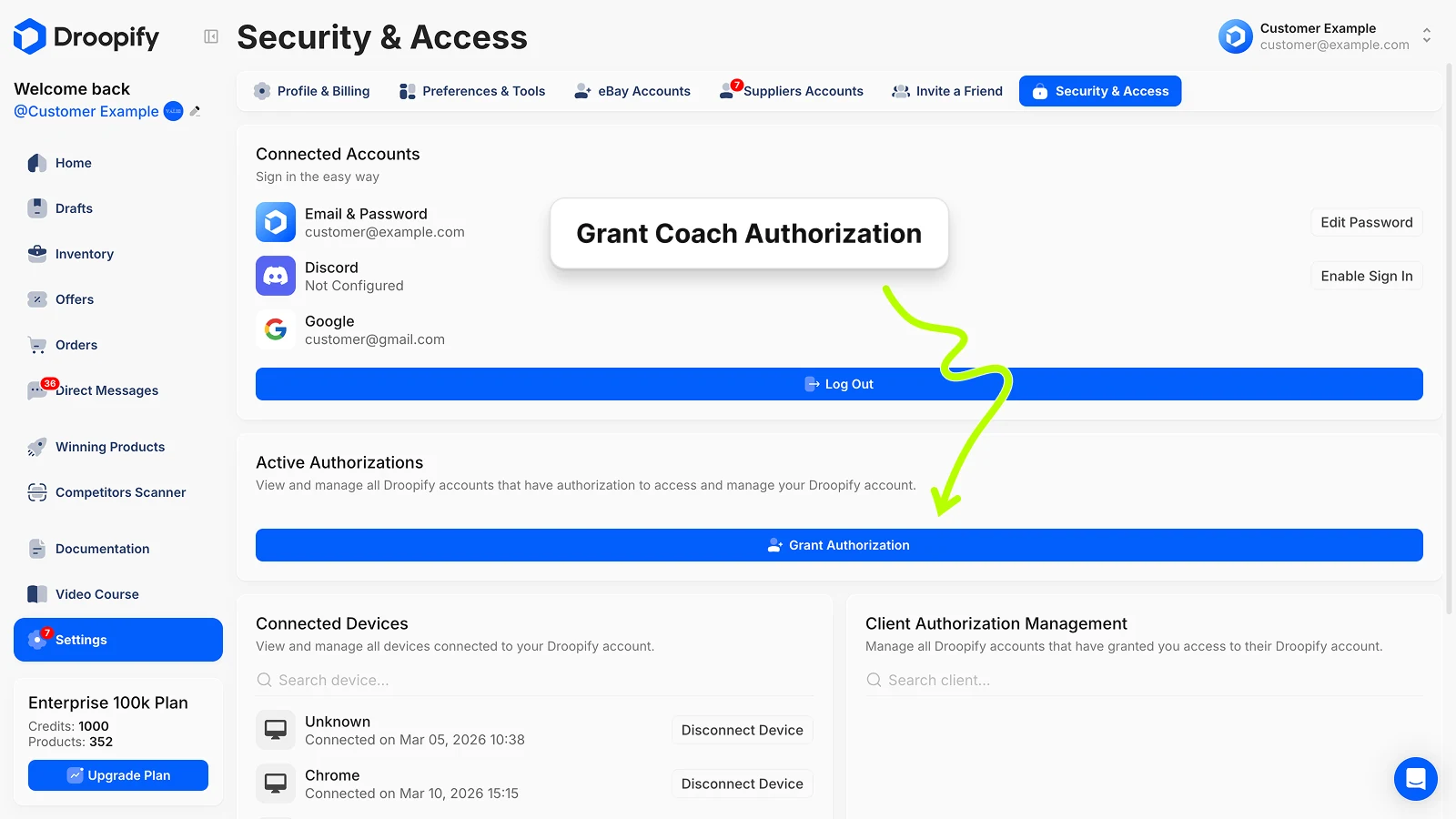
- They grant you access from Settings > Security & Access by entering your Droopify email
- You accept the request from your main dashboard
- From that point, you can switch to their account in 2 clicks, no password, no OTP required
Each client account remains fully independent. When you're inside a client's account, you see their eBay stores, orders, products, and analytics, nothing else. You can fulfill orders, upload listings, and monitor performance as if you were logged in directly with their credentials.
Droopify's Delegated Access is included in all plans at no extra cost. Try it free for 14 days.
How to Set Up Delegated Access for a DFY Client
Getting this live takes less than 5 minutes per client.
Step 1: Client registers on Droopify
Ask your client to create an account at droopify.co and subscribe to the plan that fits their store size. If you use the Droopify affiliate program, you earn recurring commissions on every subscription they activate.
Step 2: Client grants you access
From the client's account:
- Go to Settings > Security & Access
- Click Grant Authorization
- Enter your main Droopify account email
- Confirm the request
Step 3: You accept the request from your dashboard
From your main Droopify account:
- Go to Settings > Security & Access
- Find the incoming request in the bottom panel
- Click Accept
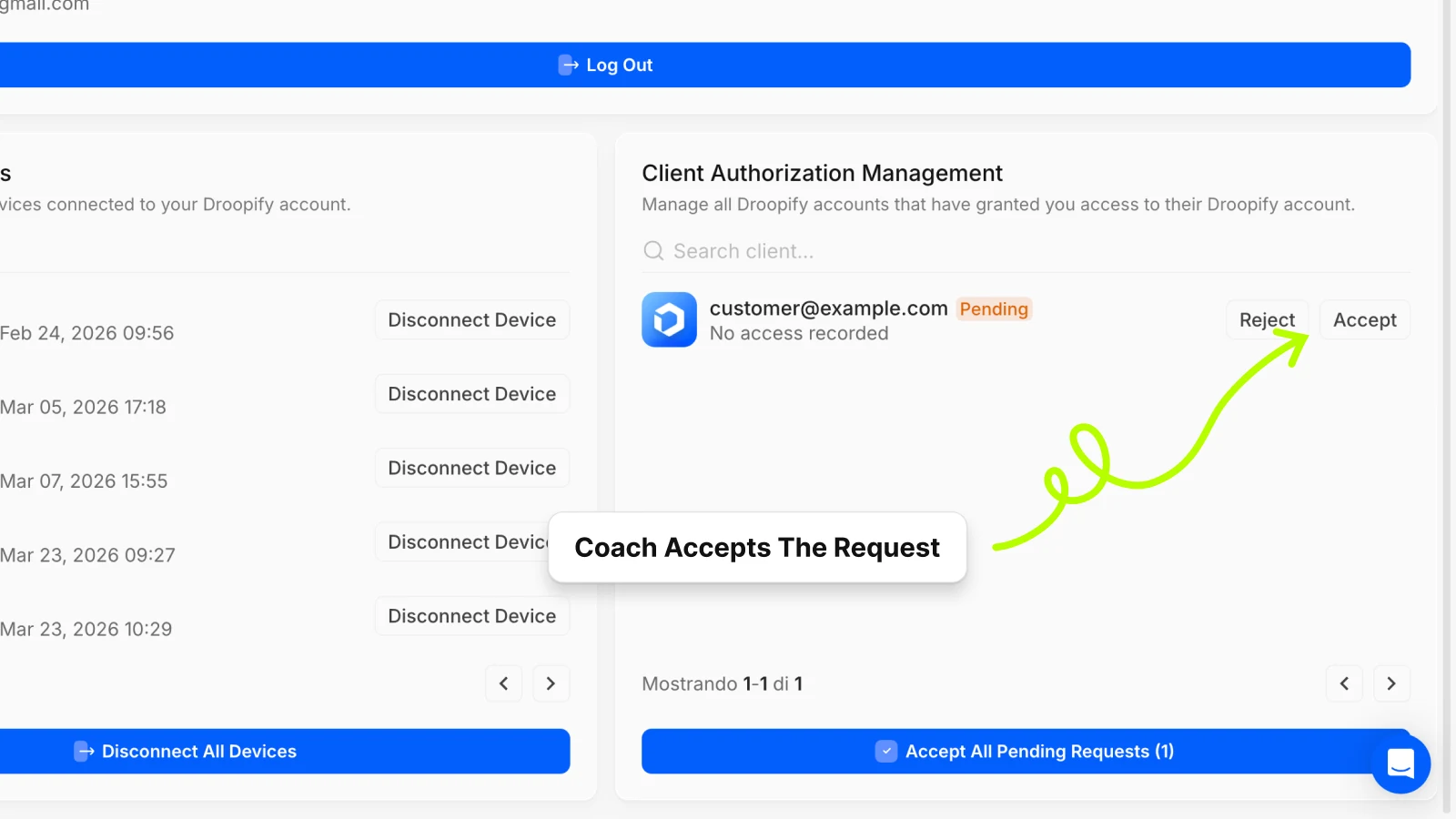
The client's account now appears in your account switcher and is ready to manage.
Switching Between Client Accounts
Once setup is complete, moving between clients takes seconds:
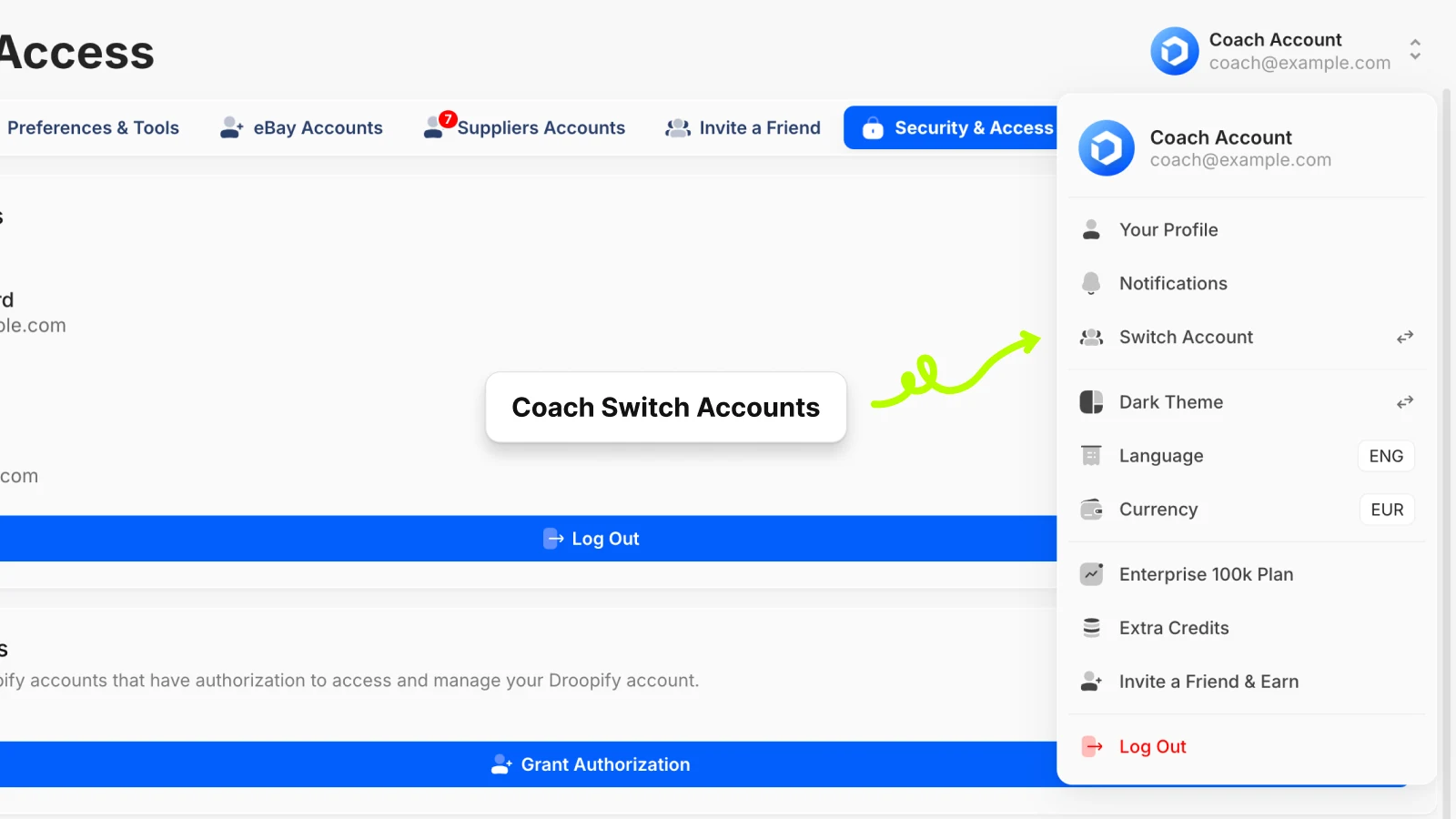
- Click your username in the top right corner of the Droopify dashboard
- Select Switch Account
- Find the client's account in the panel and click Login
The dashboard reloads with that client's data: their eBay stores, active listings, orders, and analytics. You work inside their account exactly as if it were your own.
To return to your main account, click the return icon in the top navigation bar or repeat the Switch Account flow and select your profile.
What Your Clients See (and What They Don't)
Transparency matters in a DFY service. Droopify handles it by default, on both sides.
Clients keep full control:
- They can check their own sales, profits, and order history at any time, including from the Droopify iOS app
- They see who has access to their account and the exact date and time of the last login, from the Active Authorizations panel
- They can revoke your access in one click, instantly, no approval needed
You cannot access sensitive data:
- Payment details and billing information are not visible
- You cannot modify their subscription plan
- You cannot change their security settings or revoke other collaborators
- Every action you take is logged internally by Droopify
This gives clients the confidence to hand over operational control without worrying about what you can or can't touch.
Scaling Your DFY Operation
With the delegation system in place, onboarding new clients follows a consistent pattern:
- New client onboarding: 5-minute setup per account
- Daily operations: 2-click account switch, zero credentials to manage
- Client reporting: clients check their own dashboard in real time, no manual reports needed
- Off-boarding: client revokes access in one click when the engagement ends
A single Droopify profile handles authorizations for multiple clients simultaneously. There is no limit on how many accounts you can manage from one dashboard.
Manage all your DFY clients from one place. Start your free 14-day trial.
Frequently Asked Questions
Can I manage multiple clients from one Droopify account? Yes. Each client grants you delegated access from their account, and all their accounts appear in your Droopify dashboard's account switcher. You can manage as many clients as you want from a single login, with no extra cost.
Do I need to know my client's password? No. Delegated access is completely password-free. Your client grants authorization through their Security & Access settings, and you accept it from your dashboard. You never see their password or receive their OTP codes.
What happens if I make a mistake in a client's account? Droopify logs all operations performed via delegated access internally. Every action is traceable and associated with your account, so in case of a dispute the full history is available.
Can a client revoke my access while I'm logged in? Yes. If a client revokes authorization while you're active in their account, you lose access immediately. This is by design: clients maintain full control at all times.
Is delegated access included in all Droopify plans? Yes. It's available on every plan at no extra cost, both for the DFY operator and for the client.
What can I do inside a client's Droopify account? You can view and manage their eBay stores, create and publish listings, fulfill orders, monitor performance analytics, and handle customer service workflows. You cannot modify the subscription plan, view payment details, or change security settings.
Does any other eBay dropshipping tool offer this? No. Delegated access is a Droopify-exclusive feature. No other eBay dropshipping software offers this level of secure multi-account collaboration between service providers and clients, with granted authorization, an active authorizations panel, and instant revocation.
Conclusion
Running a done for you eBay dropshipping service without the right tools means spending half your time on admin instead of growing stores. Droopify's Delegated Access removes the operational overhead: one dashboard, one login, instant switching between clients, and built-in transparency for everyone involved.
If you're building a DFY operation or already managing multiple clients, start your free 14-day Droopify trial and set up delegated access with your first client today.